If you play Dungeon Crawl Stone Soup online and suddenly see the message “this game cannot be played by a player from CAO” — or the closely related “another game is already in progress using this save” — you are not alone. This error has puzzled and frustrated DCSS players for years. It usually appears at the worst possible moment: right after your internet drops mid-run, when you try switching browsers, or when you log back in after a crash and find your character apparently still “playing” without you.
This guide explains exactly what these error messages mean, why they happen, and — most importantly — how to fix them step by step. Whether you are a newcomer to online roguelikes or a veteran who has ascended dozens of characters, this complete troubleshooting guide will get you back into the dungeon as quickly as possible.
What Does “This Game Cannot Be Played by a Player from CAO” Mean?
The error message “this game cannot be played by a player from CAO“ is a server-side restriction message generated by DCSS’s multiplayer infrastructure. In plain terms, it means the save file you are attempting to load is registered to or locked by the CAO server (Crawl.Akrasiac.Org), and the system — whether it is a different server, a different session, or a conflicted process — cannot open it on your behalf right now.
This message is closely related to the better-known variant:
“Another game is already in progress using this save! Hit any key to exit…”
Both messages point to the same underlying issue: a save file lock. DCSS online servers use a locking mechanism to prevent a character from being played in two places simultaneously. When a session ends abnormally — due to a crash, dropped connection, or browser close — the lock does not always release cleanly, leaving the save file in a “stuck” state.
In short: the server believes your character is still actively being played, and it will not let a new session overwrite or interrupt that process.
What Is Crawl.Akrasiac.Org (CAO)?
Crawl.Akrasiac.Org, universally known in the DCSS community as CAO, is one of the oldest and most established public servers for playing Dungeon Crawl Stone Soup online. Located in the United States (Arizona), it has served as a cornerstone of the DCSS online community since the early days of the game.
CAO offers:
- WebTiles — a browser-based interface that lets you play DCSS in any modern browser without installing anything
- SSH console access — for players who prefer the classic terminal experience (username and password:
joshua, or key-based authentication via the CAO RSA key) - The latest released DCSS versions, as well as several previous stable versions and the daily-updated development trunk
- Live spectating — other players can watch your game in real time
- Player ghost integration — ghosts of players who died on CAO can appear in your dungeon, and vice versa
- Automated score tracking via CAO Scoring and dcss-stats.com
Also Read: keibann
Because CAO accounts are not shared between servers, a character started on CAO lives only on CAO. If you try to access that character from a different server — or if the server itself loses track of your session — the “player from CAO” error can appear.
Why Does the Player from CAO Error Occur?
Understanding the root causes makes troubleshooting far easier. Here are the main reasons this error appears:
Cause 1: Dropped Internet Connection
The most common cause. If your browser tab closes, your Wi-Fi drops, or your computer sleeps mid-game, the WebTiles server may not receive a clean disconnect signal. The game process keeps running server-side, and the save file remains locked.
Cause 2: Browser Tab Crash or Refresh
Closing a tab or refreshing the page without first exiting the game can leave a “ghost” session on the server — an orphaned process that holds your save file hostage.
Cause 3: Simultaneous Login Attempts
Trying to log in on a second device, a second browser, or a second tab while already in a game can confuse the session manager and trigger the lock error.
Cause 4: Server-Side Process Failure
Occasionally, the server itself experiences a hiccup. If the WebTiles server crashes or is restarted during your session, the cleanup routine may not fully release your save lock.
Cause 5: Cross-Server Save Conflict
DCSS accounts and saves are server-specific. A save created on CAO cannot be loaded on another server (like CDO or CDI). Attempting to do so will trigger a “cannot be played by a player from CAO” message because the save file literally belongs to a different server’s account system.
Summary Table: Common Causes
| Cause | Description | Severity |
|---|---|---|
| Dropped Connection | Internet or browser interruption during play leaves save locked | High — very common |
| Session Lock | Server-side process still running after client disconnect | High — requires waiting or admin help |
| Cross-Server Access | Trying to open a CAO save on a different server | Medium — by design; not a bug |
| Simultaneous Login | Two sessions attempting to use the same save | Medium — resolved by logging out |
| Server Sync Issue | Server crash or restart fails to release the save lock | Low — less frequent, self-resolving |
How to Fix “This Game Cannot Be Played by a Player from CAO”
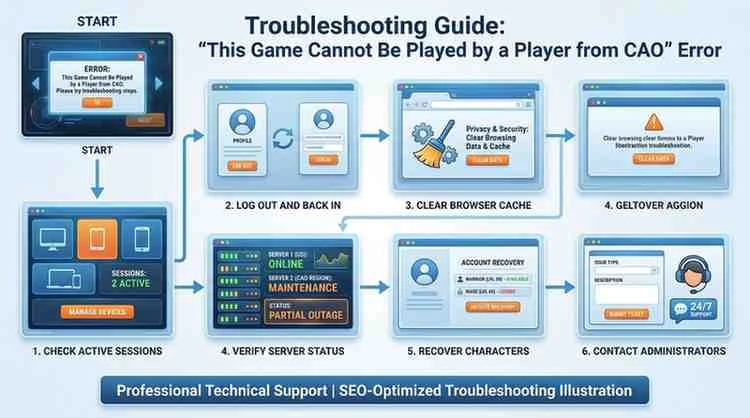
Work through these steps in order. Most players resolve the issue at Step 1 or Step 2.
Step 1: Wait It Out (The 15-Second / 24-Hour Rule)
When the lock is detected, WebTiles is supposed to display a prompt reading roughly: “There are some stale processes. They’ll be stopped in seconds. Press a key now if you don’t want this to happen!”
If you see this message, simply wait 15 seconds without pressing anything. The server will automatically terminate the orphaned process and release the lock, returning you to the lobby. You can then re-enter your game normally.
If the automatic cleanup does not fire (a known occasional bug), the lock will typically self-release within 24 hours as the server performs its regular cleanup cycle. Frustrating, yes — but your save data is safe.
Action: Log out, wait 15–30 minutes, then log back in and try again. Many players find the 24-hour wait cited in community forums is the worst case; an hour is often sufficient.
Step 2: Log Out and Log Back In Cleanly
A proper logout sequence is sometimes all it takes.
- From the WebTiles lobby, locate your active or “in-progress” game in the game list.
- Do not simply close the browser tab. Instead, use the lobby’s back/logout option.
- Wait 60 seconds.
- Clear your browser session (see Step 3).
- Log back in fresh and try to start the game.
Step 3: Clear Your Browser Cache and Cookies
Stale WebSocket connections and cached session data can interfere with the server’s ability to recognize a fresh login.
For Chrome/Chromium:
- Press
Ctrl + Shift + Delete - Set time range to “Last hour” (or “All time” to be safe)
- Check “Cookies and other site data” and “Cached images and files”
- Click “Clear data”
- Reload
crawl.akrasiac.organd log in again
For Firefox:
- Press
Ctrl + Shift + Delete - Select “Everything” from the time range dropdown
- Check “Cookies” and “Cache”
- Click “Clear Now”
Step 4: Check CAO Server Status
Before spending time troubleshooting your own connection, verify that CAO itself is online and running normally.
- Visit crawl.akrasiac.org directly. If the WebTiles page loads, the server is up.
- Check the DCSS Discord (invite available at crawl.develz.org) or the ##crawl channel on Libera IRC for any announcements about server downtime or maintenance.
- The DCSS Tavern (tavern.dcss.io) is another excellent real-time resource for server status updates from administrators and other players.
If CAO is confirmed down for maintenance, simply wait for it to come back online. Your save file is stored server-side and will be unaffected by downtime.
Step 5: Recover a Stuck Character
If your character appears frozen in an active game that you cannot re-enter:
- Log in to CAO via SSH as an alternative connection method. This sometimes bypasses the WebTiles session lock entirely and allows you to either resume or cleanly quit the game from the console interface.
- SSH to
crawl.akrasiac.org(username:joshua, or use the CAO key) - Select your character from the menu and attempt to resume
- SSH to
- If you can enter the game via SSH, save and quit properly using
Ctrl+Sor the in-game save command (S). This releases the lock cleanly. - You can then return to WebTiles and resume normally.
Step 6: Contact CAO Administrators
If none of the above steps work and you have been locked out for more than 24 hours:
- Email: The server’s primary contact information can be found on the CAO homepage (crawl.akrasiac.org). Historically, the server has been maintained by Rachel Elizabeth Dillon.
- IRC: Join ##crawl-dev on Libera IRC and ask for help. Administrators are often active and can manually clear a stuck session on request. This is the fastest route to human intervention.
- DCSS Tavern: Post in the Technical Support section at tavern.dcss.io with your username, the server (CAO), the game version, and a description of the problem.
Administrators can manually terminate stale processes and release save locks from the server side. They are generally responsive and understand this is a known issue.
Step 7: Resolve Account Synchronization Issues
If you registered the same username on multiple servers and are experiencing confusion about which server owns your save:
- Remember that accounts are completely independent per server. A “Marcus” account on CAO is a different account from “Marcus” on CDO or CDI.
- Do not attempt to copy or transfer save files between servers — this is unsupported and will cause errors.
- If you want consistent score tracking across servers under one name, register your username on every server you intend to play on. Scoring is aggregated by name at dcss-stats.com, but the save files themselves remain server-local.
What Does “Another Game Is Being Played” Mean in DCSS?
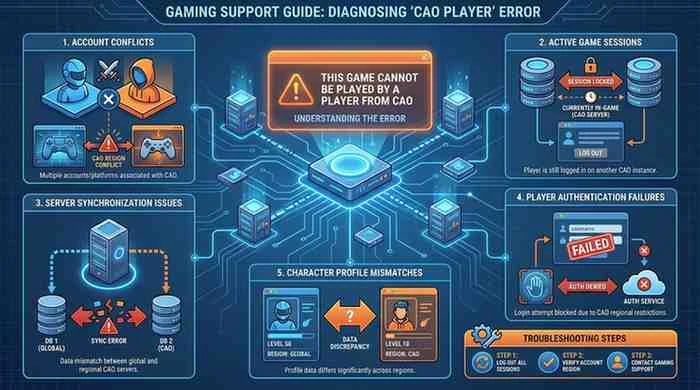
The messages “another game is already in progress using this save” and “this game cannot be played by a player from CAO” are two sides of the same coin, but they have a subtle distinction:
| Message | When It Appears |
|---|---|
| “Another game is already in progress using this save!” | Your own session is already open (self-conflict) |
| “This game cannot be played by a player from CAO” | A save is server-locked and cannot be accessed from the current context |
The first message typically means you still have an active process on the server — either from a crashed session or a second open tab. The second can also indicate a cross-server access attempt.
Both errors share the same solution path: wait for the stale process to be cleared, or request manual admin intervention.
Can Server Issues Cause the Player from CAO Error?
Yes, absolutely. Server-side problems are one of the less common but very real causes of this error. Specific server scenarios that can trigger it include:
- Unplanned server restarts that interrupt active game sessions without cleanly releasing save locks
- Database synchronization delays where the session record has not been cleared even though the process has ended
- High server load during DCSS tournaments, when many players are active simultaneously and the session manager becomes overwhelmed
- Scheduled maintenance periods where the server is taken offline without warning
In these cases, no action on your part will resolve the issue until the server-side situation is corrected. The best approach is to wait, monitor the community channels, and check back after an hour or two.
Also Read: crackstube
How Do You Recover a DCSS Online Profile?
If you are concerned about losing your character or progress, here is what you need to know:
- Your save file is stored on CAO’s servers, not on your local machine. It is not deleted by connection errors or session locks.
- Your morgue files, character dumps, and game history are all preserved server-side and accessible even when you cannot actively play.
- Score records are permanent once logged (wins, deaths, milestones).
To access your morgue or dumps without being in a game:
- Visit
crawl.akrasiac.org/scoring/and look up your username for game history. - Morgue files are often directly accessible via the server’s web interface.
For account recovery (lost password, forgotten username):
- DCSS servers do not have a standard password reset email flow like modern platforms.
- Contact the server administrator via IRC (##crawl-dev on Libera) or the contact email on the CAO homepage. They can manually assist with credential recovery.
Common DCSS Online Account Problems
| Problem | Possible Cause | Recommended Fix |
|---|---|---|
| Login fails, wrong password | Password entered incorrectly; account on different server | Double-check credentials; confirm correct server |
| Profile mismatch / “wrong” character list | Logged into wrong server by mistake | Verify URL — CAO is crawl.akrasiac.org specifically |
| Session lock / “in progress” error | Dropped connection left orphaned process | Wait 15 seconds for auto-clear, or up to 24 hours |
| WebTiles freezes or disconnects | Poor connection, browser issue, server load | Refresh browser; try SSH as alternative |
| Character not appearing | Started on different server version | Check version list in lobby; each version has separate saves |
Tips to Prevent CAO Account Conflicts
Prevention is better than troubleshooting. Follow these practices to dramatically reduce your chances of hitting save lock errors:
Always save and quit properly. Use the in-game save command (S key) before closing your browser. This sends a clean quit signal to the server and releases the save lock gracefully.
Do not simply close the browser tab. This is the single most common cause of orphaned sessions. Get in the habit of quitting the game from within DCSS before closing the window.
Avoid multiple simultaneous sessions. Never try to log in on two devices or two browser tabs at once. If you need to switch devices, save and quit on the first device completely before opening the game on the second.
Use a stable internet connection. Mobile connections, shared Wi-Fi, and VPNs can cause unexpected disconnections. If your connection is unreliable, save frequently and be prepared for the occasional session lock.
Stay on one server per character. Plan which server you want to play on and stick to it for a given character. Attempting to switch servers mid-game is not supported.
Monitor community channels during tournaments. During official DCSS tournaments, server load increases significantly. Save more frequently and be extra patient if lock errors occur.
Pros and Cons of Online Character Synchronization Systems
| Pros | Cons |
|---|---|
| Save files are backed up server-side — no local data loss | Session locks can strand players after crashes |
| Play from any device or browser without transferring files | Accounts are not shared between servers |
| Game history, morgues, and scores are permanently recorded | No standard password recovery system on most servers |
| Spectating and ghost integration enrich gameplay | Cross-server saves are unsupported by design |
| No local installation required for WebTiles play | Server downtime affects all players globally |
What Are the Most Interesting Facts About DCSS and CAO?
| Topic | Key Insight |
|---|---|
| Game Origin | DCSS is a free, open-source successor to Linley’s Dungeon Crawl (1997), developed collaboratively by the community |
| CAO’s Role | One of the oldest DCSS public servers; located in Arizona, USA; also known as crawl.akrasiac.org |
| WebTiles | Browser-based interface requiring no local install; the most popular way to play DCSS online today |
| Save Lock Mechanism | Designed to prevent simultaneous play of one character; a rare design limitation that creates session lock errors |
| Tournament Play | Official DCSS tournaments have been hosted on CAO and CDO since the 0.10 era, attracting hundreds of global players |
| Multiple Server Ecosystem | There are over eight official public DCSS servers worldwide; accounts are independent on each |
| Ghost System | When you die on CAO, your ghost can haunt other players’ games on the same server |
| SSH Access | CAO supports both WebTiles (browser) and SSH console access, offering flexibility for different player preferences |
Frequently Asked Questions About the CAO Player Error
What does “this game cannot be played by a player from CAO” mean?
It means the DCSS save file you are trying to load is locked by the CAO server — typically because a previous session did not end cleanly. The server believes the character is still being played and is blocking a new session from accessing the save file.
How do I fix the player from CAO error?
Start by waiting 15–30 seconds to allow the server’s automatic stale-process cleanup to run. If that does not work, log out, clear your browser cache, and try again. If the issue persists after 24 hours, contact a CAO administrator via IRC (##crawl-dev on Libera) for manual session clearance.
What is Crawl.Akrasiac.Org (CAO)?
CAO is one of the primary public servers for Dungeon Crawl Stone Soup online play. Located in Arizona, USA, it supports both browser-based WebTiles play and SSH console access. Accounts, saves, and score records on CAO are independent from all other DCSS servers.
Why does DCSS say “another game is being played”?
This message means the server has an active or orphaned session associated with your save file. This commonly happens after a dropped internet connection, browser crash, or tab closure without properly saving and quitting.
Can I recover my character after the error?
Yes. Your save file is stored on CAO’s servers and is not damaged or deleted by session lock errors. Once the lock clears (automatically or through administrator intervention), your character will be fully accessible and in exactly the state it was when the session dropped.
Is the issue caused by the server?
Sometimes. Server restarts, maintenance windows, and high tournament traffic can all trigger session locks. In these cases, the fix is simply to wait. For most players, however, the cause is a client-side disconnection rather than a server problem.
Does WebTiles contribute to account conflicts?
WebTiles itself is not the cause, but the nature of browser-based connections — which can drop without sending a clean disconnect signal — makes session lock errors more common via WebTiles than via a stable SSH connection.
How can I prevent this error in the future?
Always use the in-game save command (S key) before closing your browser. Avoid opening multiple sessions, maintain a stable internet connection during play, and do not try to access a CAO save file from a different server.
Should I contact CAO administrators?
If you have been locked out for more than 24 hours and the automatic cleanup has not resolved the issue, yes. Administrators on ##crawl-dev (Libera IRC) can manually clear stale processes quickly. They are generally helpful and familiar with this type of problem.
Is the error permanent?
No. Save lock errors always resolve eventually — either automatically within a few hours, or through administrator intervention. Your character data, score history, and morgue files are safe throughout.
Case Study: A Real-World Troubleshooting Example
The Situation: A player named “Taranis” was running a promising MiFi (Minotaur Fighter) on CAO WebTiles. During a particularly tense fight on Dungeon level 9, their Wi-Fi router dropped out. When their connection came back a few minutes later, they reloaded the WebTiles page, logged in — and saw their game listed as “in progress” in the lobby. Clicking to resume produced the message: “Another game is already in progress using this save! Hit any key to exit…”
The Diagnosis: The sudden disconnect did not send a clean quit signal to CAO’s WebTiles server. The game process remained running server-side, holding an exclusive lock on Taranis’s save file. The session was real from the server’s perspective — it just had no connected client controlling it.
The Resolution — Step by Step:
- Taranis waited 15 seconds after the error message appeared, hoping the auto-cleanup prompt would fire. It did not.
- They waited 30 minutes and tried again. Still locked.
- They checked the DCSS Tavern and Discord. No reported server issues on CAO that day.
- Taranis connected to CAO via SSH (using PuTTY on Windows with the CAO RSA key) as an alternative interface.
- Via SSH, the game lobby showed the same “in progress” game. They selected it and were dropped into the game console.
- Once inside via SSH, they pressed
Sto save and quit cleanly. - Returning to WebTiles, Taranis was able to resume the game without any error message.
The Lesson: Maintaining SSH access as a backup is extremely valuable. When WebTiles is stuck, the SSH interface often bypasses the deadlock. The MiFi survived and went on to clear the Lair.
Conclusion
Encountering “this game cannot be played by a player from CAO“ is one of the more disorienting experiences in DCSS online play, but it is almost always temporary and completely harmless to your character. The error exists because of how DCSS’s server infrastructure protects save files from simultaneous access — a sensible design that occasionally misfires when connections drop unexpectedly.
To summarize the key takeaways:
- The error means your save file is locked by a stale server session, not that your character is lost
- Wait 15–30 minutes as your first action — the server often self-clears
- Save and quit properly using the
Skey before closing your browser to prevent it happening again - SSH access can bypass WebTiles session locks and is an invaluable troubleshooting tool
- CAO administrators on ##crawl-dev (Libera IRC) can manually resolve stuck sessions quickly
- Your character, save data, and score history are always safe on the server
The DCSS community is one of the most helpful in all of online gaming. If you find yourself stuck, the Tavern, Discord, and IRC channels are full of experienced players and developers who have dealt with this exact issue and can guide you through it.
Did this guide help you get back into the dungeon? Share your experience in the comments below — which step resolved your CAO error? If you know another player who has been locked out of their DCSS game, share this article with them. You can also explore related troubleshooting guides on our site, join the conversation in the DCSS community, or subscribe to stay updated on the latest DCSS guides and tips.
Happy crawling — may your next run see the Orb safely to the surface.